Next.js Feedback Widget
Let people report a broken layout or confusing interaction directly from your Next.js app. BugDrop turns their description, optional annotated screenshot, and browser context into a GitHub Issue, so your team can investigate alongside its code. Add it with one browser script in your App Router layout; no React provider or feedback API route is needed.
Use this guide when: you want to add a feedback widget to a Next.js App Router app. For preview deployments only, see Vercel Preview Feedback.
Try the reporting flow or install BugDrop.
From a page problem to a GitHub Issue
Suppose the Pay button covers the total on a mobile checkout. A reporter opens BugDrop, describes the overlap, and captures the affected area. They can annotate the screenshot and review it before submitting. The resulting issue brings the description, screenshot when attached, page URL, browser, and viewport into the repository you configure.
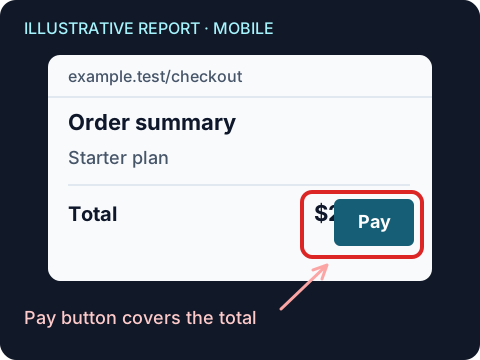
This gives developers a starting point for reproduction. The reporter still needs to explain what they expected and the steps that led to the problem; a screenshot cannot supply those details by itself.
Add the widget to your App Router layout
First, install the GitHub App for the repository that should receive feedback. Review its permissions and choose the repositories it can access. Then add the script below to your existing root layout, keeping your existing fonts, providers, and other layout content.
Replace owner/repo with that repository's owner and name. This example uses the website's pinned v1.56.4 runtime and keeps screenshots optional so reporters can review, annotate, redact, or skip them.
// app/layout.tsx
export default function RootLayout({ children }: { children: React.ReactNode }) {
  return (
    <html lang="en">
      <body>
        {children}
        <script
          src="https://bugdrop.neonwatty.workers.dev/widget.v1.56.4.js"
          data-repo="owner/repo"
          data-screenshot="optional"
        />
      </body>
    </html>
  );
}
Use a plain script element without async or defer, following BugDrop's installation loading contract. BugDrop reads configuration from the executing element. Keep this example as a normal script rather than replacing it with next/script, whose strategies change script loading. Place one copy in the shared layout, not in both root and nested layouts. See version pinning before changing the runtime URL.
Test the integration as a reporter
Open a page, open the feedback button, and check that the form and screenshot review are usable on desktop and mobile. Cancel the report, navigate to another route using your app's navigation, and open the widget again. There should still be a single launcher. Check that it does not cover checkout actions, navigation, or other controls on a small screen.
For a delivery check, submit a clearly identified test report to a test repository where you have installed the App. Confirm the issue appears in that repository with the intended screenshot and page context. Opening the widget alone does not verify delivery.
Choose where feedback is available
The root layout makes feedback available throughout the app. A route-group layout can limit it to one surface; test both a direct visit and navigation into and out of that group. For deployment reviews, follow the preview-only Vercel pattern.
Use the configuration reference to choose theme, position, language, button label, and screenshot mode. For private dashboards, remember that logging into your Next.js app does not automatically authenticate BugDrop submissions. Review the hosted access model and screenshot security limits, and mark sensitive regions before enabling capture on customer or billing pages.
Advanced checks and troubleshooting
The Playwright CI guide covers the ready event, current widget selectors, and automated checks without creating an issue. Run a production build and repeat the navigation check before rollout; development behavior alone is not enough to confirm the integration.
If the widget is missing, check that the script response is JavaScript, its repository configuration is correct, and your Content Security Policy allows the required script and API connections. If reports fail, check the App's repository access and screenshot-branch permissions in installation.
Once reports arrive, decide who will triage them. GitHub Issues routing explains how to keep incoming feedback useful to the team.