Visual Bug Reporting
A visual bug is an interface problem you can see: overlapping buttons, clipped text, a missing image, or a layout that breaks on a small screen. Visual bug reporting shows the problem with a screenshot or annotation and explains what should happen instead. BugDrop helps send that evidence from your website to GitHub Issues, together with page and browser context.
Use this guide when: you want to write visual reports that a developer can reproduce and act on. For capture settings, see Screenshot Feedback Widget.
Try the reporting flow or use the visual bug report template.
Example: a button overlaps the checkout total
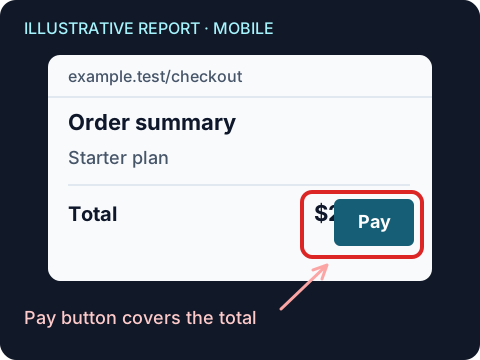
Imagine a checkout that looks correct on desktop, but its Pay button covers the order total on mobile. “Checkout looks wrong” leaves the developer guessing. Here is how to make the report useful.
1. Show the broken layout
Capture the order summary with enough surrounding context to show where the overlap happens. Draw a box around the affected region and point to the button. A focused area capture is easier to inspect than a screenshot of the entire long page.
2. Add the expectation and steps
A useful description for this example is: “At a 390px-wide viewport, the Pay button covers part of the total. The full price should remain visible and the button should sit below it. Add the Starter plan to the cart, open checkout, and view the order summary.”
The annotation locates the problem; the description explains why it is wrong and how to reach it. Review the capture for private information before sending it.
3. Hand the report to the developer in GitHub
After a successful BugDrop submission, the configured repository receives an issue with the report and its available context. A developer can use the URL and viewport to reproduce it, then compare the corrected layout against the expected behavior.
Illustrative issue summary
Pay button covers the checkout total on mobile
- Observed: the total is partially hidden behind Pay.
- Expected: the full total is visible above the button.
- Steps: add Starter plan, open checkout, view order summary.
- Page: https://example.test/checkout
- Viewport: 390 × 844
- Evidence: annotated order-summary capture.
An example of the information to include, not an exact issue template or a real submission. BugDrop also includes browser, OS, and language information.
A five-part visual bug report
Ask reporters for five things:
- Observed state: what is visibly wrong?
- Expected state: what should the interface show or allow?
- Location: which page, component, or selected element is affected?
- Reproduction: what actions and data state produced the problem?
- Environment: which viewport, browser, OS, and language were present?
BugDrop automatically contributes the current URL and environment fields. Its manual screenshot flow can add a full-page, area, or element capture with annotation. The reporter's description should supply the expectation and reproduction steps that pixels cannot explain.
Match evidence to the defect
Different defects need different evidence:
- Layout overlap or clipping: capture the affected region and enough neighboring context to show the constraint.
- Responsive mismatch: record the viewport and describe whether resizing or rotation triggered the state.
- Wrong content or style: point to the exact element and state the expected value or design rule.
- Interaction failure: describe each action; a still screenshot usually shows only the final state.
- Intermittent or network behavior: include reproduction timing and use a tool with logs or replay when necessary.
BugDrop is strongest for reporter-authored visual evidence routed to GitHub. It does not capture session replay or network traffic. Console log submission is optional and reporter-controlled when configured, so it should not be treated as automatic telemetry.
Triage without guessing
When a report arrives, the reviewer should first check whether the expected behavior is clear and the issue is safe to reproduce. Then:
- Reproduce at the reported viewport and route.
- Confirm whether the issue is visual, data-related, or behavioral.
- Request missing steps without assuming the screenshot is current truth.
- Link the fix and verification evidence to the GitHub Issue.
- Close only after the corrected state has been checked at relevant breakpoints.
Categories and labels can route Bug, Feature, and Question submissions, but label mapping is not a substitute for human triage.
Privacy belongs in the process
Visual reports can expose account data, messages, analytics, and customer identifiers. Mark sensitive DOM regions, prefer manual review, and teach reporters to redact visible information before submission. Treat masking as visual coverage with known browser limitations, not as a security boundary.
Use the Screenshot Privacy Checklist before a team standardizes capture, sharing, and retention. It remains usable when BugDrop is not the capture tool.
The bugdrop-screenshots branch contains user-generated artifacts. Keep it outside privileged automation and define retention or cleanup for the project.
Build a small visual QA loop
Start with one surface and three representative defects: a responsive overlap, a content mismatch, and an interaction state. Have a non-developer report them, then ask a developer to triage without verbal context. Record which fields or screenshots were useful and which questions remained.
If the gaps are mostly form or screenshot configuration, adjust BugDrop. If the gaps require replay, automatic logs, or a managed review workspace, choose a better-fitting tool through the comparison hub. When the workflow is sound, install BugDrop and agree who will own incoming reports. Teams automating their integration checks can use the CI testing guide.